Nov 5, 2026
How to find grants and tenders for your company with Proposal Peak
Find grants and tenders matched to your business. Describe your company, review requirements and manage your application in one place. Register free.
Which grants and tenders could be relevant to your company? For most SMEs, startups, NGOs and research teams, answering that question takes days. Funding calls sit on dozens of portals, tender notices come in many languages, and every document is long. Proposal Peak shortens that work to a few minutes. You describe your business, and the platform shows you opportunities that fit it, then helps you organise the application if you decide to go for one.
This guide explains how Proposal Peak works, step by step, so you can see exactly what happens between your first search and your first application task.
Why finding the right opportunity is the hardest part
Many companies miss funding for a simple reason: they never saw the call, or they saw it too late. Others spend a week reading a tender, only to find out in the eligibility section that they cannot apply.
Two problems cause most of the lost time:
- Scattered sources. EU grants, public tenders and national programmes are published in different places, in different formats.
- Unclear fit. A title rarely tells you whether the scope, the requirements and the scoring rules suit your company.
Proposal Peak is built to solve both. It matches opportunities to your company profile first, and it gives you the key requirements in one view before you invest time in a full read.
How Proposal Peak works in 4 steps
Step 1: Describe your company
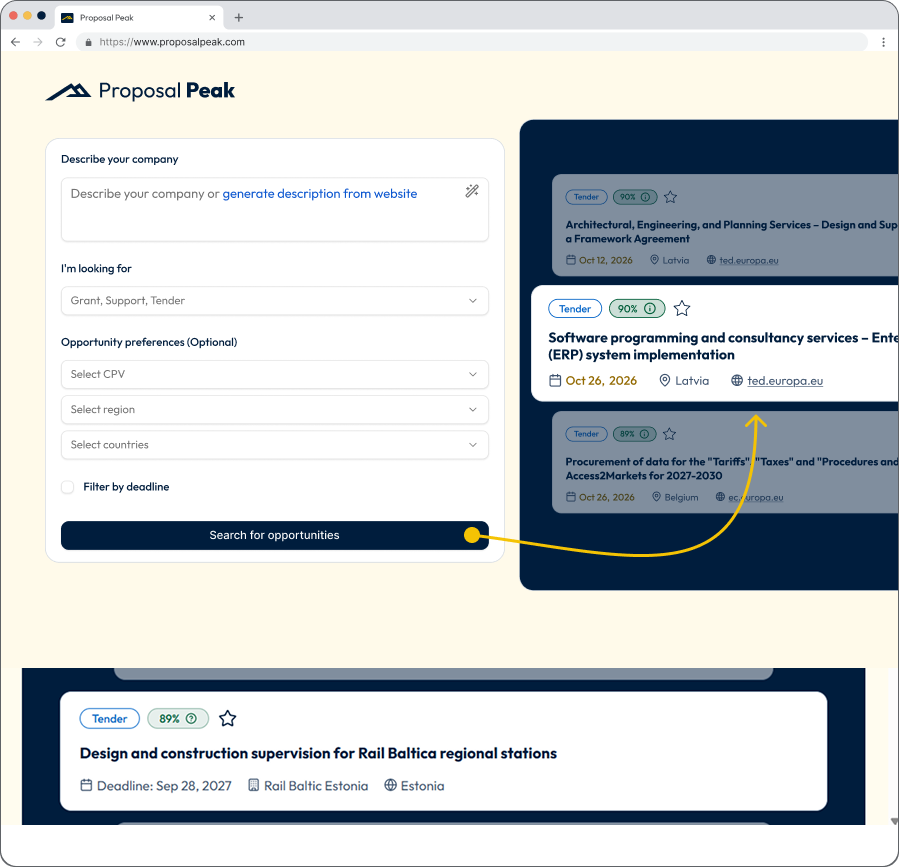
Start on the search page. Type a short description of what your company does, or click generate description from website and let the platform build one from your site. A clear description is the base for every match you see afterwards, so include your sector, your main products or services and the kind of projects you deliver.
Step 2: Choose what you are looking for
Use the I'm looking for menu to pick the opportunity types you want: Grant, Support or Tender. You can select one or all three.
If you want tighter results, the optional preferences let you narrow the search:
- CPV code, the standard classification used in public procurement
- Region
- Countries
- Deadline filter, to see only opportunities you still have time to pursue
Then click Search for opportunities.
Step 3: Review your matches
Each result shows the essentials at a glance: the opportunity type, a match score, the deadline, the country and the source, such as ted.europa.eu. The match score tells you how closely an opportunity fits your company description, so the strongest candidates appear first. Use the star to save the ones you want to come back to.
When a result looks promising, open it. Each card gives you three options: Start application, Book a consultation and View details.
Step 4: Check the details before you commit
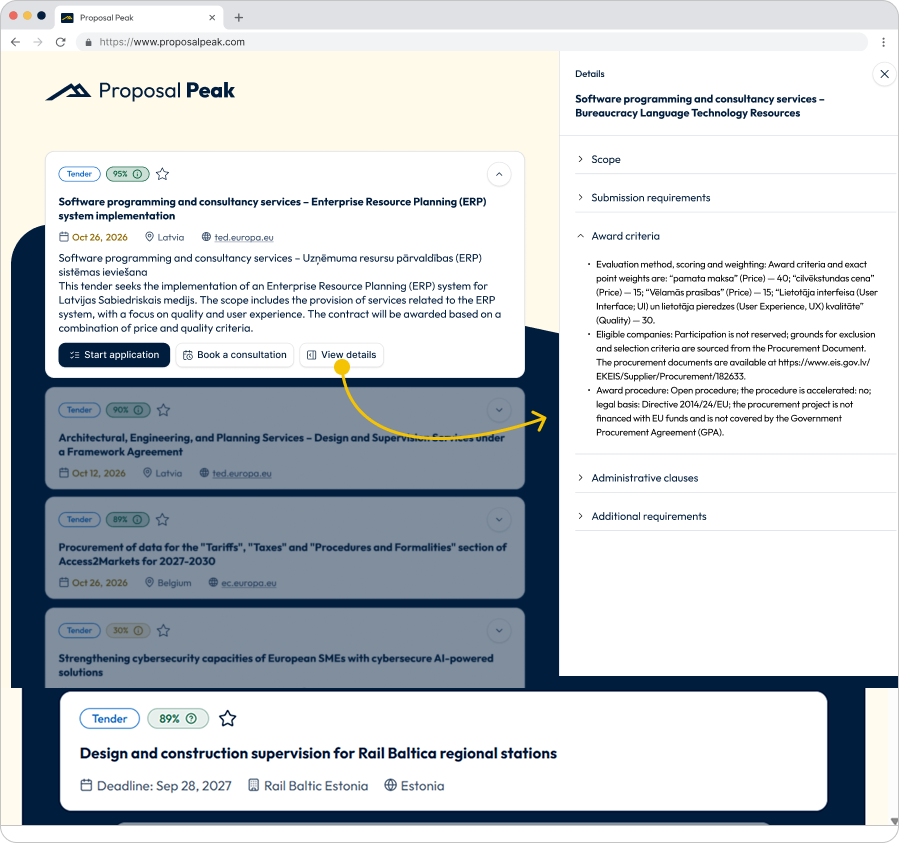
The View details panel opens next to your results and organises the information you would otherwise dig out of long documents:
- Scope: what the buyer or funder wants delivered
- Submission requirements: what you must provide and how
- Award criteria: how proposals are scored and weighted, for example price against quality
- Administrative clauses: legal and procedural conditions
- Additional requirements: anything else that affects your decision
In the example above, the award criteria show the exact weighting between price and quality, plus who may take part and which procedure applies. That is the information you need to make a go or no-go decision in minutes.
From search to application: organise your work
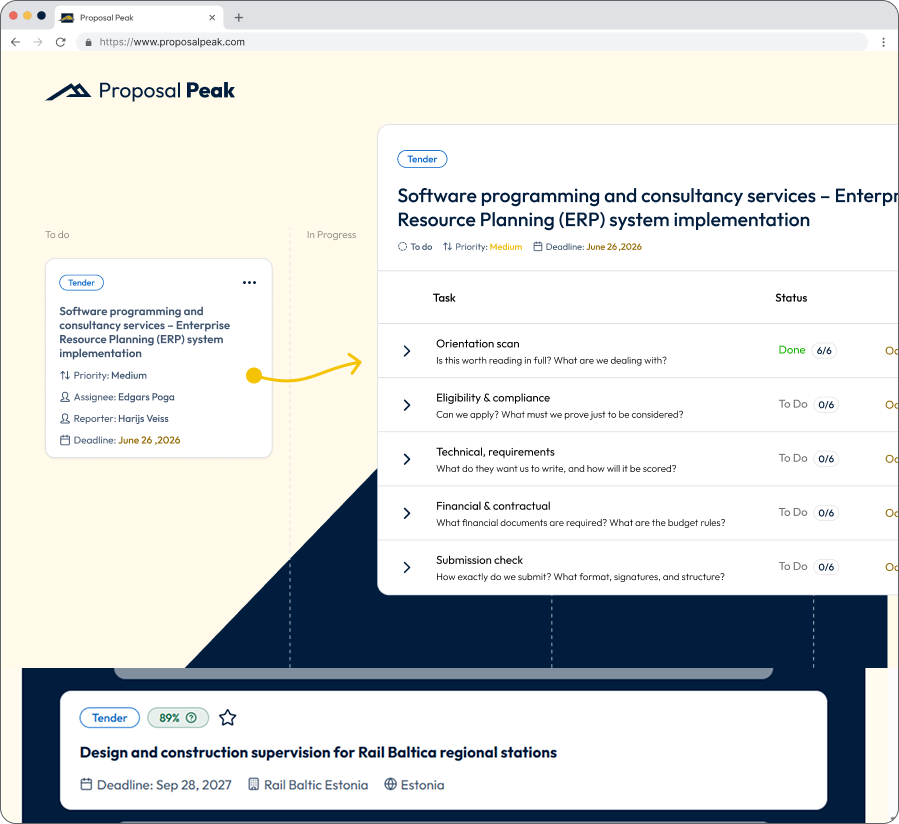
When you decide to move forward, click Start application. Proposal Peak opens an application workspace built around a task board.
Each opportunity becomes a card with a priority, an assignee, a reporter and a deadline, so everyone on your team knows who owns what. Inside the card, the work is split into clear task groups, each with a guiding question:
- Orientation scan: Is this worth reading in full? What are we dealing with?
- Eligibility and compliance: Can we apply? What must we prove just to be considered?
- Technical requirements: What do they want us to write, and how will it be scored?
- Financial and contractual: Which financial documents are required? What are the budget rules?
- Submission check: How exactly do we submit? What format, signatures and structure?
Every group has its own subtasks and a progress counter, such as 6/6 when the orientation scan is done. You see at a glance what is finished, what is next and where a deadline is at risk.
Who Proposal Peak is for?
Proposal Peak suits any organisation that applies for public money or public contracts:
- SMEs and startups looking for EU, national or regional grants
- NGOs that depend on project funding
- Research organisations preparing consortium or innovation proposals
- Companies bidding on public tenders in sectors such as defence, medtech, forestry, IT and consulting
What you gain
- Time – one search replaces hours of browsing several portals.
- Focus – match scores and filters point you to opportunities that fit.
- Clarity – requirements and award criteria are visible before you commit.
- Control – a task board keeps your team aligned from the first scan to the final submission check.
- Support when you want it. If an opportunity is complex, you can book a consultation with the Proposal Peak team.
Frequently asked questions
What types of opportunities can I find with Proposal Peak?
You can search for grants, support programmes and tenders, including tenders published on sources such as TED (ted.europa.eu).
Do I need to know CPV codes or funding programme names?
No. You can start with a plain description of your company. CPV codes, regions and countries are optional filters for when you want a more precise search.
What does the match score mean?
The match score shows how closely an opportunity fits the company description you entered. A higher score means a stronger fit, so you can prioritise your reading.
Can my team work on an application together?
Yes. The application workspace assigns tasks, priorities and deadlines to team members and shows progress for each stage.
Is registration free?
Yes. You can register for free and run your first searches. When you are ready to use the full application workspace regularly, you can choose a subscription.
Start finding opportunities today
The right grant or tender may already be open and matched to what your company does. Describe your business, see your matches and open the details in a few minutes.
Register for free at proposalpeak.com and explore the opportunities that fit your company. Ready for more? Choose a subscription to unlock the full application workspace and keep every bid organised from search to submission.
Author: Proposal Peak project manager, Edgars Poga